Pyro Studios × LeoLabs
Working with the New Site
A practical guide to using the new website day-to-day. Who does what, how content flows, when integrations run, and what to do when something looks wrong.
SCROLL TO EXPLORE ↓
01 - Roles
Who Does What
The new site is designed for LeoLabs to handle most content work in-house, with Pyro stepping in only for things outside the admin's day-to-day forms. Greenhouse and LinkedIn flow in semi-automatically.
LeoLabs editors
All day-to-day content. Blog posts, press releases, news, events, resources. Approving LinkedIn posts. Uploading media.
LeoLabs IT
Granting and removing admin access via Entra group membership. Reviewing the audit log. Watching for security alerts.
Pyro Studios
Structural design changes. New page layouts. New content types. New integrations. Infrastructure and security. Anything outside the admin's day-to-day forms.
02 - Publishing
Publishing Content
The most common workflow. From login to live site in under five minutes for typical content.
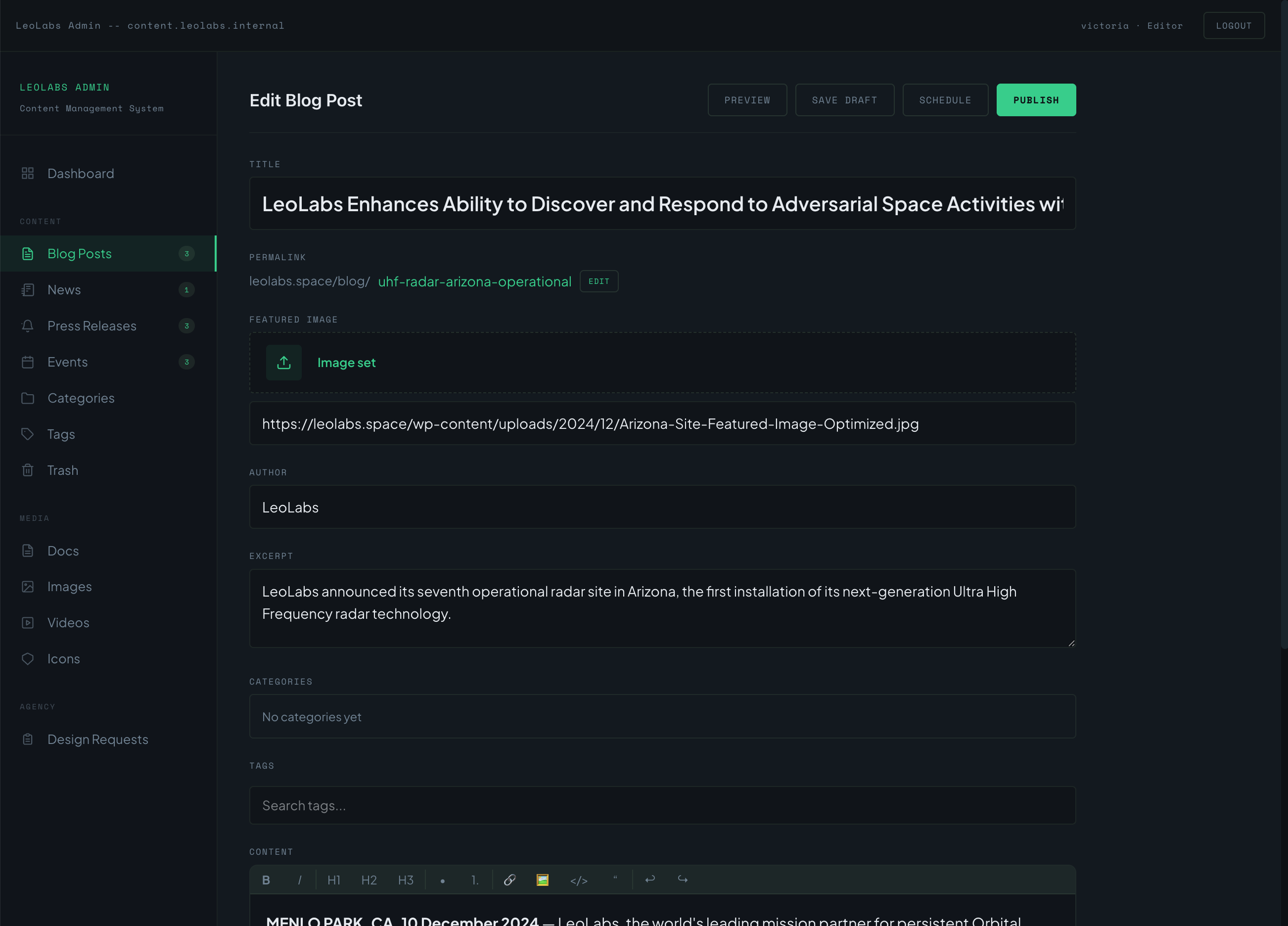
Log in
Open the admin panel. Sign in with your LeoLabs Microsoft account through Entra SSO. No separate password to remember. If your IT team has disabled your account, access ends immediately.
Pick a content type
Blog post, press release, news, event, resource. Each has its own structured form with the fields it needs. No free-form pages, no plugin conflicts.
Write or paste
Use the rich text editor for body content. Headings, lists, links, embeds. Paste from Google Docs and formatting is preserved.
Add media
Upload images and documents directly. Files are stored in Cloudflare R2; videos go through Cloudflare Stream. No bandwidth surprises, no plugins.
Preview
Click Preview to see exactly how the post will look on the live site. Different from the WordPress preview, this is the actual rendered page.
Save draft, schedule, or publish
Save Draft to come back later. Schedule for a future date and time. Publish to push live now. Scheduled posts trigger an automatic site rebuild at the scheduled moment.
Site rebuilds
Within about two minutes of hitting Publish, the post is live globally. A small status indicator shows the build progress.
03 - Change Requests
Submitting a Design or Structural Change
For anything that's outside the admin's day-to-day forms. New pages, layout changes, new sections, embedded tools, anything that requires Pyro to write code.
The Form
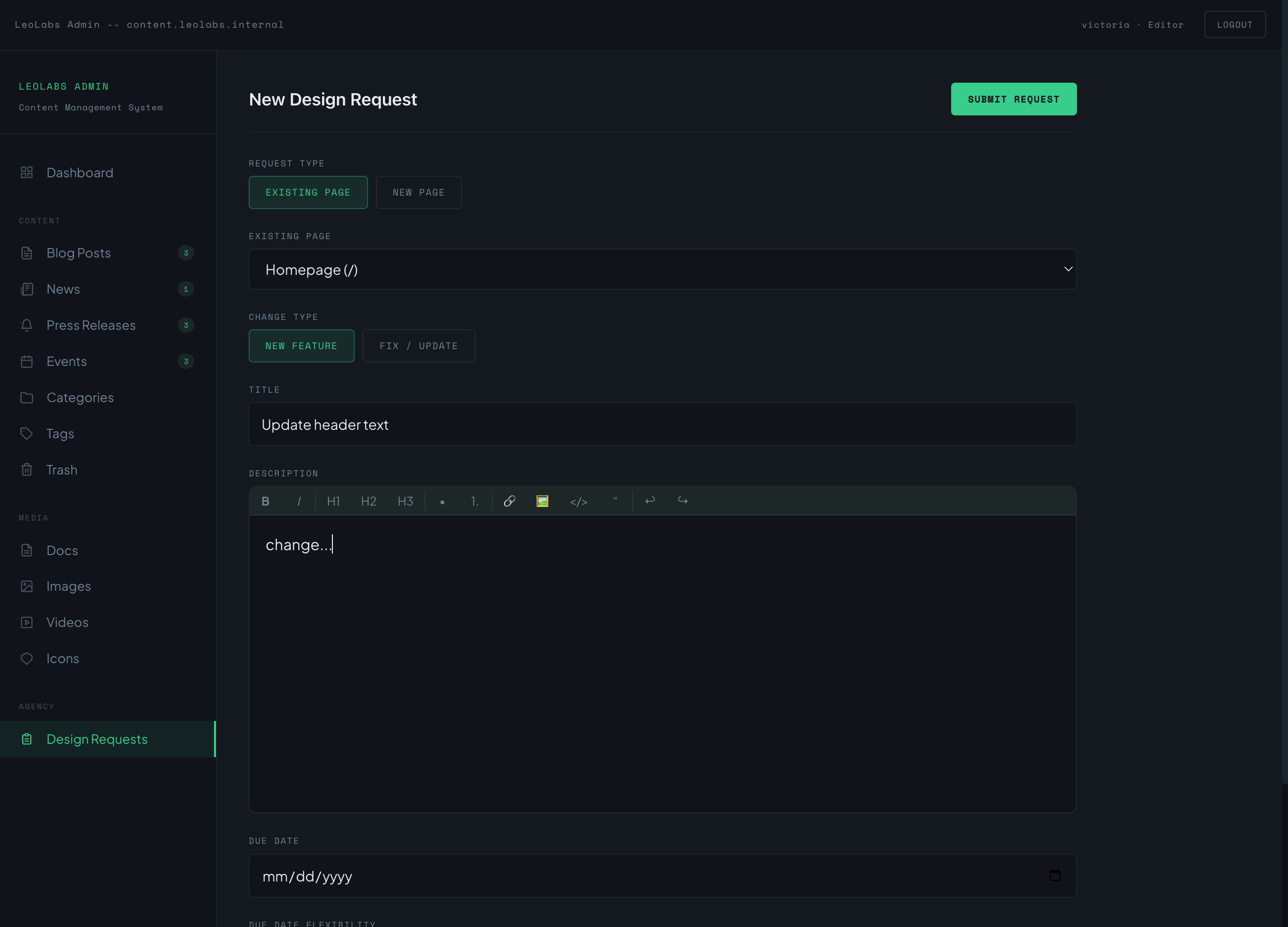
The Pipeline
Once submitted, your request moves through these four stages. You can see live status from the Change Requests dashboard.
New About Us page
Submitted 2 hours ago
Form filled out and submitted. Pyro receives an email and admin notification. Initial review and scoping start within one business day.
Whitepapers section
Started Monday
Scope confirmed. Pyro is actively building the change in a separate branch, with progress updates posted in the request thread.
Careers hero update
Preview ready
Build complete and deployed to a preview URL. LeoLabs reviews on the preview, leaves feedback, and approves before anything goes live.
Podcast embed widget
Live since Apr 18
Change merged to main and deployed to the live site. Request closed and archived in the dashboard for future reference.
04 - LinkedIn (semi-automated)
How LinkedIn Posts Reach the Site
The goal: write each post once on LinkedIn, have it appear on the website without re-entering it. Nothing publishes without an authorized human approving it.
The LinkedIn Flow
Post on LinkedIn
Write once, post normally
Pull
Twice daily, or Pull Now button
Review & Approve
Editor reviews in admin
Live on Site
Within ~2 min of approval
How posts arrive in the queue
A scheduled job runs twice a day, fetching the last 7 days of posts from LeoLabs' LinkedIn company page. Any new post lands in the LinkedIn Review Queue in the admin. Images are downloaded to LeoLabs' Cloudflare R2 bucket so the live site never hotlinks LinkedIn.
Manual Pull Now
When you publish something timely on LinkedIn and want it live on the website immediately, click Pull Now in the admin. The fetch runs on demand and the post appears in the queue within seconds.
Review and approve
Each pending post shows a live preview, automated security flags (suspicious URLs, unusual domains), and Approve / Edit / Reject buttons. Edit lets you adjust copy, change a headline, or swap an image before approving.
What publishes when
Approved posts trigger a site rebuild and appear within about two minutes. Rejected posts are archived (not deleted) so there's an audit trail. Nothing reaches the live site without an authorized human approving it.
05 - Greenhouse (automated)
How Job Postings Reach the Site
The most hands-off integration. Post a job in Greenhouse, the website updates automatically.
The Greenhouse Flow
Post a Job
in Greenhouse as usual
Webhook Fires
instantly, no delay
Site Rebuilds
static pages regenerate
Live on Site
within ~2 min, no manual step
Post or edit a job in Greenhouse
Use Greenhouse exactly the way you do today. The website is not in this loop.
Webhook fires automatically
Greenhouse sends a webhook to the website's build pipeline the moment a job is created, edited, or closed. No manual step on the website side. Ever.
Site rebuilds, careers page updates
The build pipeline fetches the current job list, regenerates the careers page, and deploys. Within about two minutes the new posting (or removal) is live globally.
Safety net
A scheduled job runs once a day as a backup. If a webhook is ever missed, the next scheduled run catches the delta. There is no scenario where a job posted in Greenhouse stays missing from the website indefinitely.
06 - Media
Working with Media
One central library for images, documents, and video. Upload once, reuse anywhere.
radar-array.jpg
earth-vis-loop.mp4
ceo-headshot.jpg
logo-mark.svg
whitepaper-q2.pdf
symposium-2026.jpg
satellite-001.jpg
team-photo.jpg
- →Upload images, documents, or video directly from any content form.
- →Images go to Cloudflare R2; videos go to Cloudflare Stream. The team does not need to think about where things live.
- →Tag and search media from the central library. Reuse the same image across multiple posts without re-uploading.
- →Cloudflare automatically generates optimized image variants (sizes, formats) on demand. Older browsers get JPEG; modern browsers get AVIF.
- →There are no bandwidth overage fees on R2. Heavy traffic days do not produce surprise bills.
07 - Access
User Access via Entra
The website has no separate user database. Permissions follow Microsoft Entra group membership. Onboarding and offboarding happen in your existing IT process.
Sign in
Can't access your account?
What this looks like in practice
When an authorized user visits the admin panel, they're redirected to LeoLabs' Microsoft sign-in page. The website never sees their password.
- →MFA, conditional access, password policy: all enforced by Entra
- →Disabling an Entra account immediately ends admin access
- →No website-side password reset flows to maintain
Adding a new editor
LeoLabs IT adds the person to the appropriate Entra group (Editor, Admin, or whatever roles you define). On their next login attempt, they're in. No website-side account creation, no password to share, no manual provisioning.
Removing an editor
LeoLabs IT removes the person from the Entra group. On their next page load (or token refresh), access is revoked. If you need to revoke immediately, you can also disable their Entra account, which kills all active sessions across LeoLabs systems at once.
Changing someone's role
Move them between Entra groups. Their permissions in the admin panel update on the next login.
What this means in practice
There is no separate website user list to keep in sync with HR. Onboarding and offboarding happen in your existing IT process. The website inherits whatever Entra says is true.
08 - Security View
For the Security Team
What Daniel's team needs to know about ongoing operations.
Audit log
Every create, update, delete, login, and permission change is logged with user, timestamp, and diff. Queryable from the admin UI; exportable to a SIEM if LeoLabs streams Cloudflare logs there.
Defacement detection
A scheduled job runs every 15 minutes, hashing key pages and comparing against a known-good value. Any mismatch fires an alert through whatever channel LeoLabs prefers (Slack, email, PagerDuty).
Rotating credentials
Cloudflare deploy tokens rotate every 90 days. LinkedIn OAuth refreshes automatically every ~60 days. All other secret rotation is documented in the runbooks delivered with the project.
What triggers a security review
Unexpected admin login from an unknown IP, content integrity mismatch, WAF blocking spike, npm audit critical advisory, or any audit log entry that doesn't match a known team action. Each has a documented runbook for response.
09 - Boundaries
When to Call Pyro vs Handle In-House
✓ LeoLabs Handles In-House
- →Writing, editing, and publishing all content types
- →Approving and editing LinkedIn posts in the queue
- →Adding or removing editors via Entra groups
- →Reviewing the audit log
- →Rolling back a recent deploy if something looks wrong
- →Submitting design or change requests through the admin
⚠ Call Pyro For
- →New page layouts or major design changes
- →New content types beyond what the admin supports today
- →New integrations with third-party systems
- →Anything that touches infrastructure (DNS, Cloudflare configuration, secrets)
- →Security incidents or suspected compromise
- →Anything that breaks and isn't a one-click rollback
10 - Recovery
When Something Looks Wrong
The simple incident path. The new architecture is built so almost any problem can be fixed by reverting the last deploy in seconds.
Roll back the last deploy
From the Cloudflare Pages dashboard (or the admin's Deploys section), one click reverts to any previous deploy. Live site restored within seconds. This is the right answer 95% of the time.
Check the audit log
Recent activity is in the admin's Audit Log section. See who changed what, when. If it's a wrong content edit, revert that specific item from the version history.
Call Pyro
If a rollback doesn't fix it, the audit log shows nothing useful, or you suspect a security issue, contact Pyro through the support channel agreed at handoff. The runbooks delivered with the project cover the common scenarios with specific steps.
Want to understand the architecture behind these workflows?
Read the Tech Deep Dive →